Drumagog 6 vs Logic Pro Drum Replacement
Logic Pro has a drum replacement command built in. What you want to know is how far it goes on a real session with cymbals and bleed. This page takes Drumagog 6 and Logic’s own tool through the questions buyers ask.
The short answer
Logic’s command turns one recorded drum into a MIDI track that plays its Sampler. After that, a change means editing the notes or running it again. Drumagog 6 runs as an Audio Unit on the drum track, and it replaces the drum as the song plays. At any point in the mix, you can change the sound or the threshold. It also covers the cymbals, and it goes with you to any other DAW.
Drumagog 6 is the one to choose if you want to
- change your mind at any point in the mix
- replace hi-hats and cymbals as well as the kick, snare and toms
- get the whole kit from one drum bus with Platinum
- trigger samples while you record
- use the same tool in Logic, in Pro Tools or on Windows
Where each one has the edge
Here are the things buyers ask about most. Each row says what you get with either one.
Changing your mind afterward
Drumagog 6The replacement stays live on the track.
Logic’s drum replacementThe result is a MIDI region.
Edge Drumagog 6
More than one drum at a time
Drumagog 6Kit mode replaces all six drums from one copy, with Platinum.
Logic’s drum replacementOne run for each single-drum track.
Edge Drumagog 6
Hi-hats and cymbals
Drumagog 6GOGs for the hi-hat, ride and crash.
Logic’s drum replacementThe menu offers Kick, Snare, Tom or other.
Edge Drumagog 6
Fixing a missed or false hit
Drumagog 6Move, add or remove any hit on the waveform.
Logic’s drum replacementEdit the notes in the MIDI region.
Edge Even
Bleed setting off false hits
Drumagog 6REMOVE SIMILAR, plus an EQ and a gate before the trigger.
Logic’s drum replacementIt reads the track without its plug-ins.
Edge Drumagog 6
Lining the sample up with your drum
Drumagog 6Each hit is aligned by itself.
Logic’s drum replacementOne Timing Offset shifts every trigger note.
Edge Drumagog 6
Keeping some of the original drum
Drumagog 6BLEND.
Logic’s drum replacementDoubling mode.
Edge Even
Triggering while you record
Drumagog 6Live mode plays the sample as the drummer plays.
Logic’s drum replacementIt works on recorded regions.
Edge Drumagog 6
Windows and other DAWs
Drumagog 6VST3, AU and AAX on macOS and Windows.
Logic’s drum replacementIt is part of Logic Pro.
Edge Drumagog 6
Getting MIDI you can edit
Drumagog 6A piano roll, plus a clip you drag out.
Logic’s drum replacementA MIDI region on its own track.
Edge Even
Drumagog 6 details are from this site. Logic details are from Apple’s Logic Pro User Guide, apple.com and Sound On Sound’s Logic column.
Can I change my mind afterward?
Choose Replace or Double Drum Track, and Logic analyzes the transients on the selected track. In a dialog, you set a Relative Threshold and click OK. The result is a MIDI region on a Sampler track. Sound On Sound’s Logic column calls it a shortcoming that once the MIDI is generated, there is no going back.
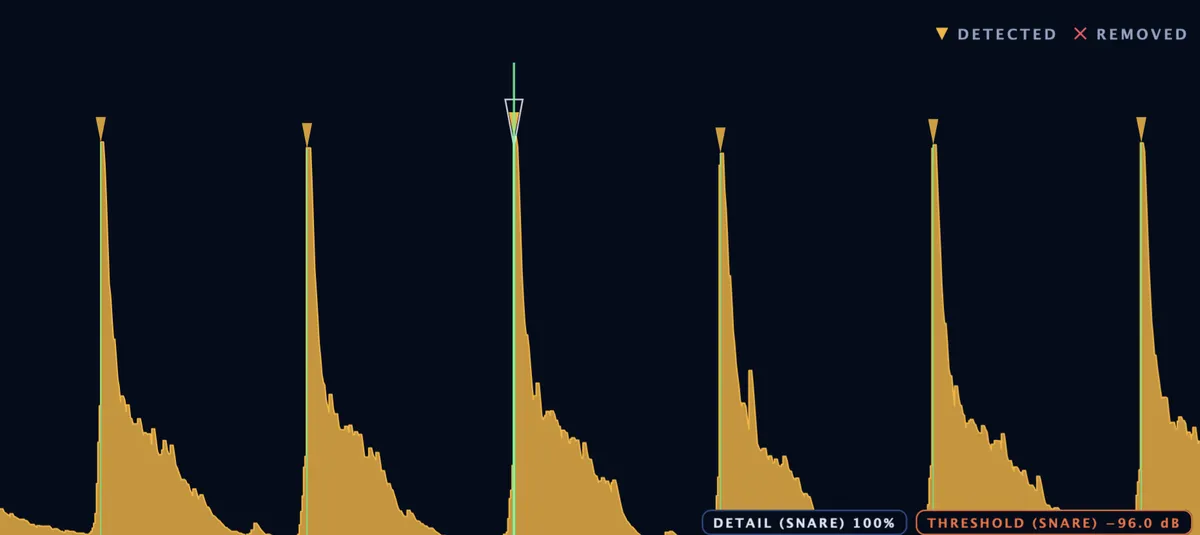
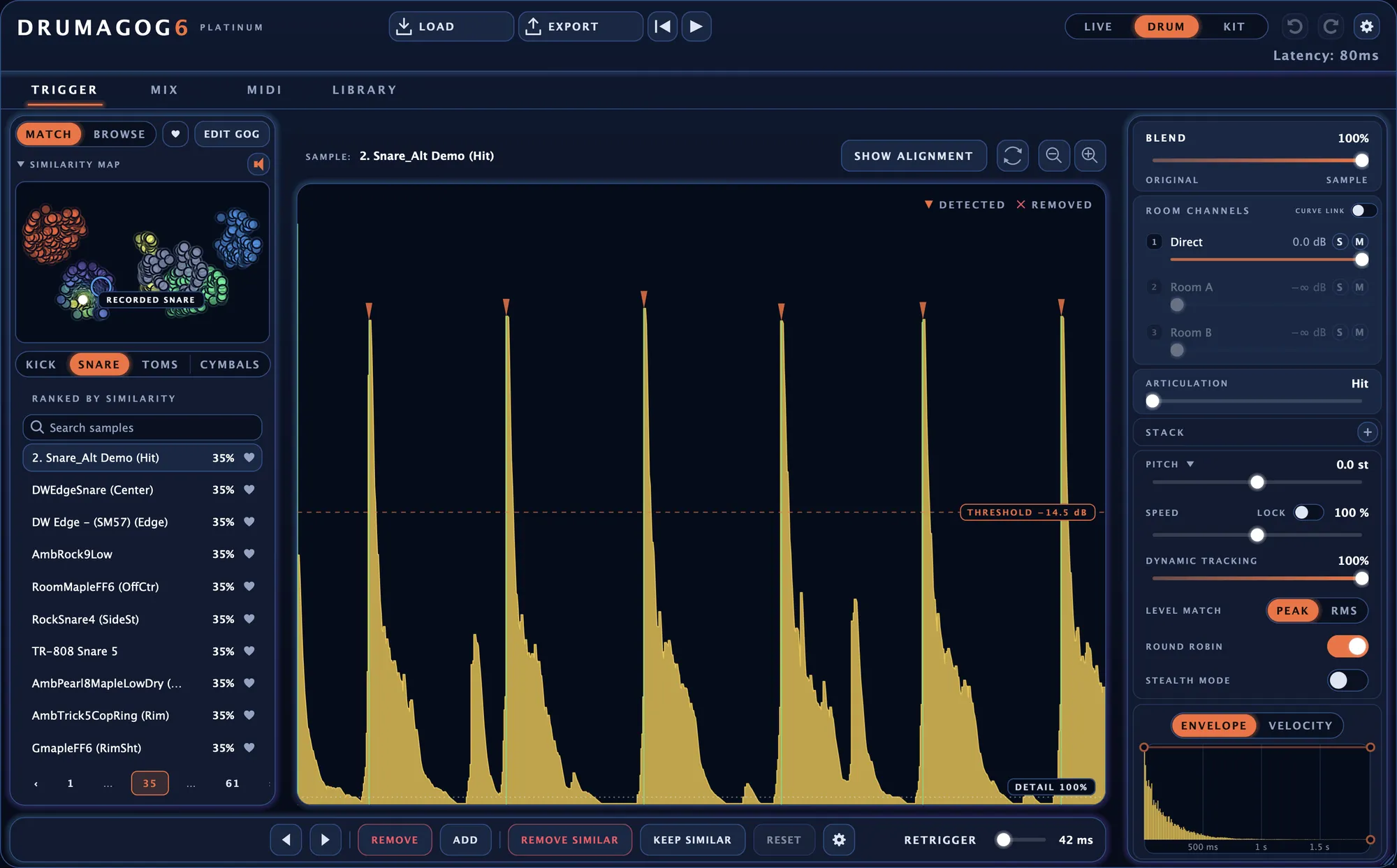
Drumagog 6 keeps the replacement live on the track. Drag the THRESHOLD line late in the mix, and the hits update while you drag. Try another GOG, and you hear it right away. Every hit stays on the waveform, where you can move it or take it out.
Verdict Drumagog 6 has the edge. Nothing is final until you say so.
Can it handle more than one drum at a time?
Apple’s guide starts from an audio track that holds a recording of a single drum. Each run builds one Sampler track from it. For a kit, you run the command again for every drum.
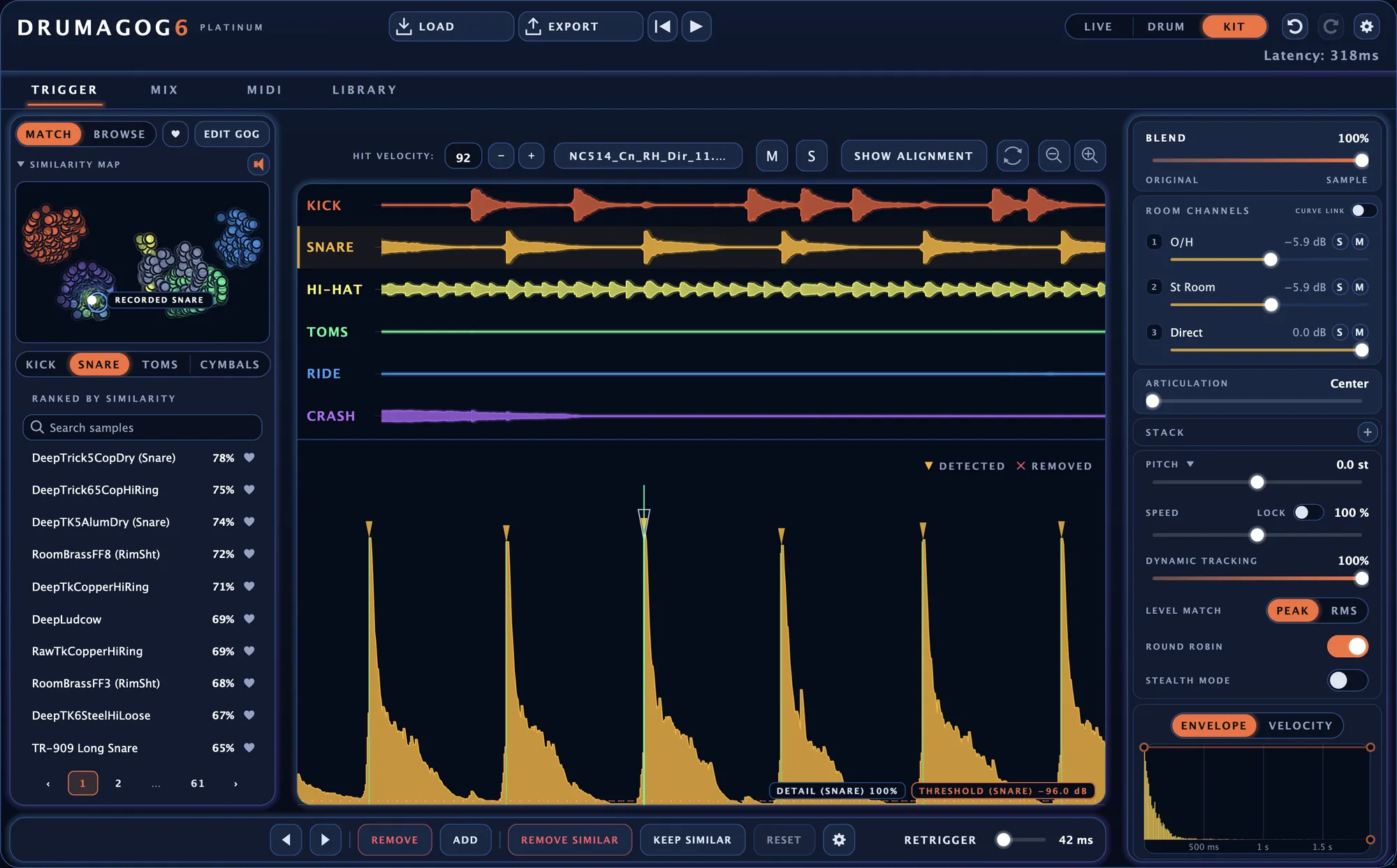
With Platinum, put one copy of Drumagog 6 on the drum bus, an overhead pair or a room mic. Kit mode finds the hits on all six drums. Each drum gets a lane on the TRIGGER page and a channel strip on the MIX page. One move can set a knob on every drum at once, as a single undo step.
Verdict Drumagog 6 has the edge. One copy takes the whole kit.
What about hi-hats and cymbals?
The dialog’s Instrument menu offers Kick, Snare, Tom or other. A hi-hat or cymbal track goes in as other. From then on, its trigger notes all land on one pitch, C3 by default.
Drumagog 6 has GOGs for the hi-hat, ride and crash. With Platinum, it hears how open each hi-hat hit was and plays the matching articulation. A pedal sweep moves through your samples from closed to open. Each kind of hit also gets a MIDI note of its own.
Verdict Drumagog 6 has the edge. It knows a closed hat from an open one.
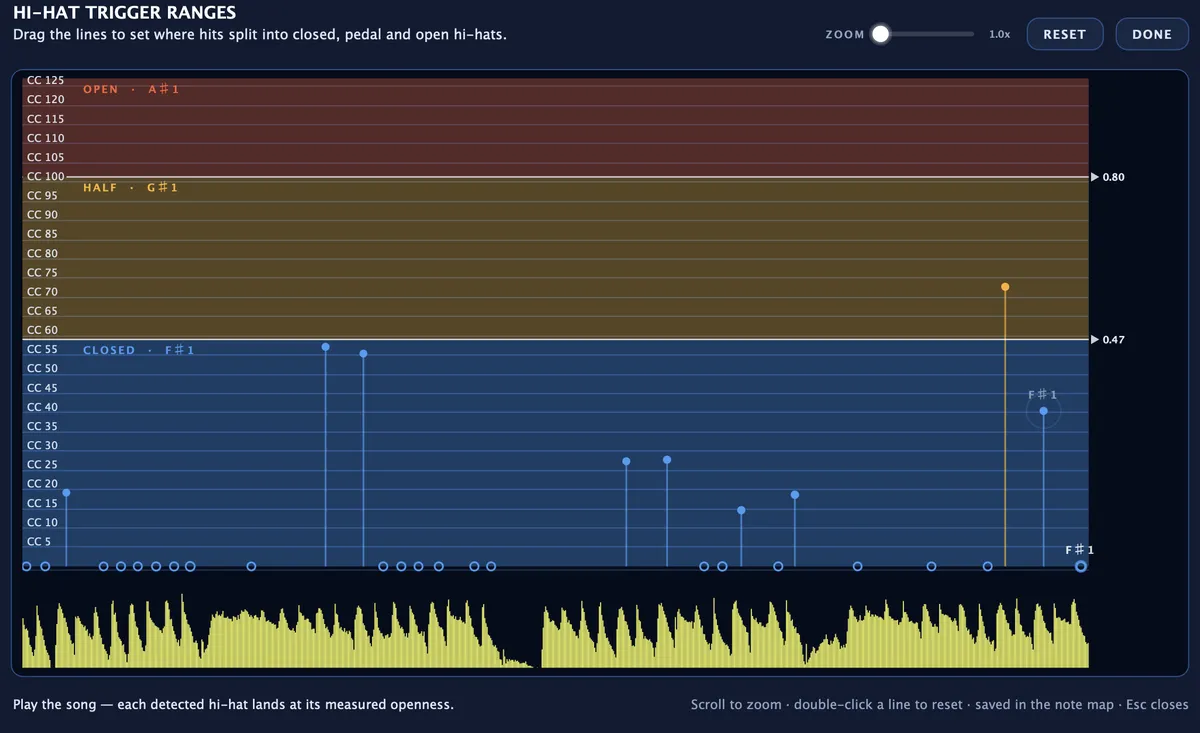
The HI-HAT TRIGGER RANGES window shows how open each hit was.
What about bleed?
Logic’s command reads the track as it was recorded. According to Sound On Sound, it ignores plug-ins on the track. A gate only counts once you bounce the track with it. For heavy bleed, the same article suggests erring on the side of caution and including some unwanted hits.
Drumagog 6 has a PRE-TRIGGER page for this. On the snare’s EQ, a low cut can stop the kick from setting it off. Platinum adds a gate that shows what it cuts in red. For any false hits left, select one and press REMOVE SIMILAR, and every hit that sounds like it goes in one step.
Verdict Drumagog 6 has the edge. It cleans up what it hears before it triggers.

Will the sample line up with my drum?
In Logic, the trigger notes sit at the detected transients. A Timing Offset slider shifts all of them earlier or later together. Apple’s guide notes it may need adjusting when you use your own or third-party instruments.
Drumagog 6 lines up every sample on its own hit. Align to Phase is the default, and it matches the body of each sample to the original drum. When the two are tuned differently, Align to Transient puts the start of each sample on the start of the hit. SHOW ALIGNMENT draws each replacement over your waveform, exactly where it plays.
Verdict Drumagog 6 has the edge. Each hit is aligned by itself.
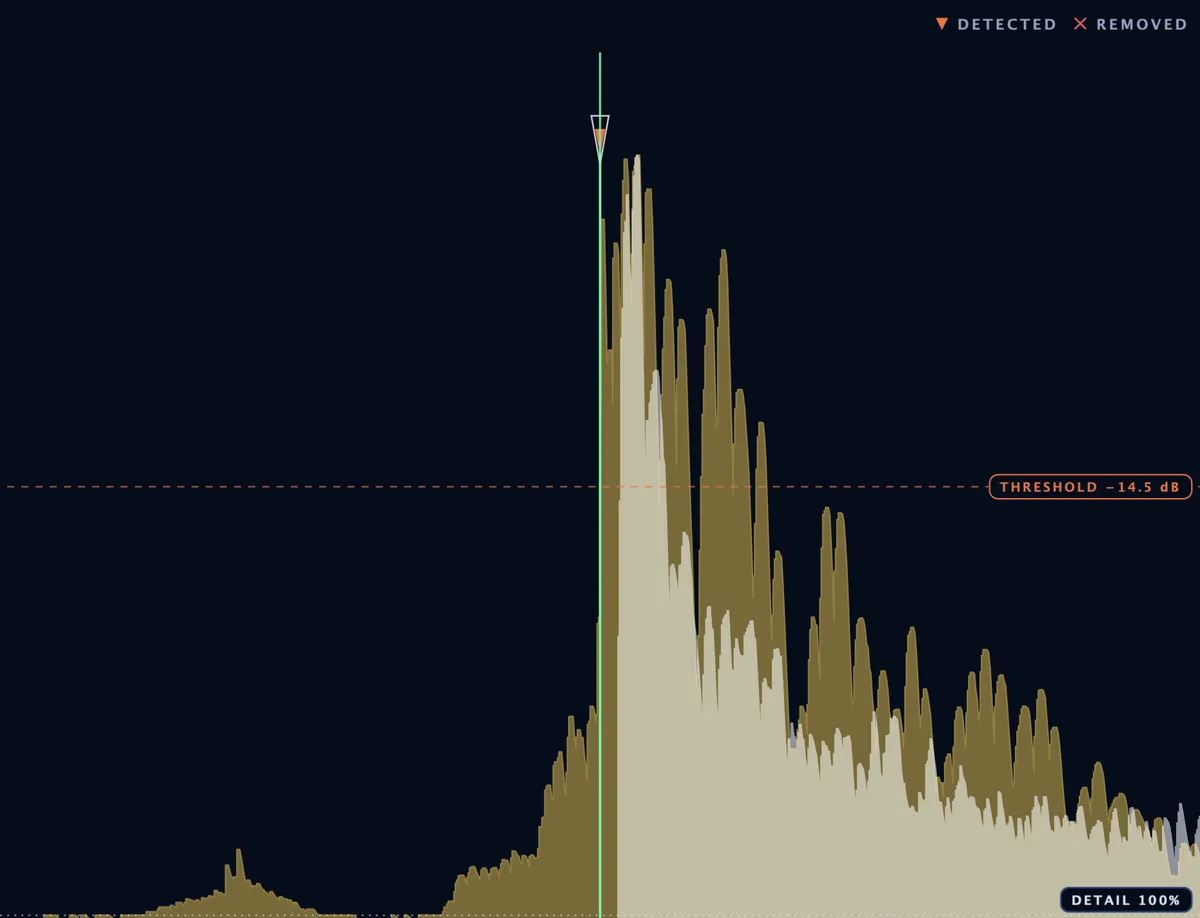
One kick hit with SHOW ALIGNMENT on. The replacement sits in white over the original.
Does it work on Windows or in another DAW?
The command is part of Logic Pro, in its Track menu. Apple makes Logic Pro for Mac and iPad. According to its site, Logic Pro requires a Mac with Apple silicon.
Drumagog 6 runs as VST3, Audio Unit and AAX on macOS and Windows. On a Mac, it is native on Apple Silicon and Intel. A standalone app comes with both editions. The tool you use in Logic is the same one you use in Pro Tools or REAPER.
Verdict Drumagog 6 has the edge. It goes wherever your sessions go.
The standalone app, with LOAD and EXPORT in the title bar.
Can it trigger while I record?
Logic’s command works on regions that are already recorded.
Drumagog 6 has Live mode for tracking. In the studio or on stage, it plays each sample as the drummer hits the drum. Later, in the mix, switch the same copy to Drum mode, and every hit becomes editable.
Verdict Drumagog 6 has the edge. The drummer hears the sound while playing.
Can I still get MIDI into Logic?
Both give you MIDI in Logic. The built-in command writes a MIDI region on its own track.
From Drumagog 6, you drag the whole take onto a track as a MIDI clip. Drumagog can also appear as a virtual MIDI device called DRUMAGOG 6. From there, Logic records it like any other MIDI input. Every note sits on Drumagog’s piano roll first, ready to edit.
Verdict Call this one even. Either way, you end up with MIDI you can edit.
What reviewers and Apple’s own pages say
You don’t have to take our word for any of this. Each line below links to where it was published.
“once the MIDI is generated, there’s no going back”
“the Drum Replacement function ignores plug‑ins on the track”
“an audio track that contains a recording of a single drum”
“Kick, Snare, Tom, or other”
Side by side
| Drumagog 6 | Logic’s drum replacement | |
|---|---|---|
| Finding the hits | ||
| How it works | An effect on the drum track | A MIDI track that plays Logic’s Sampler |
| When the hits are found | As the song plays | When you run the command |
| Drums it handles | Kick, snare, hi-hat, toms, ride and crash | Kick, snare, tom or other |
| A whole kit from one drum bus | ✓ Kit mode, Platinum | One drum per track |
| Live triggering while you record | ✓ Live mode, about 2 ms | Works on recorded regions |
| Setting what counts as a hit | THRESHOLD, DETAIL and RETRIGGER, heard while you drag | Relative Threshold slider |
| Editing the hits | ||
| Fixing the hits | Every hit on the waveform, with REMOVE SIMILAR and KEEP SIMILAR | Edit the MIDI notes |
| Hi-hat openness and tom sizes | ✓ Automatic, Platinum | One trigger note per drum |
| Lining up the sample | Align to Phase or Align to Transient, checked with SHOW ALIGNMENT | Timing Offset slider and Set average attack time |
| Sounds and library | ||
| Sounds | 536 GOGs with a paid license, plus your own | Sampler sounds from Logic’s Library |
| Keeping the original drum | BLEND and STEALTH MODE | Doubling mode |
| MIDI | ||
| MIDI from the hits | A piano roll, a drag-out MIDI clip, MIDI out and a virtual MIDI port | A MIDI region on its own track |
| Note maps | General MIDI, Superior Drummer, EZdrummer or your own | Kick C1, snare D1, tom A1, other C3 |
| Price and platform | ||
| Price | $99 Pro, $199 Platinum, one-time | Part of Logic Pro, $199.99 or by subscription |
| Runs on macOS and Windows | macOS and Windows, as VST3, AU, AAX or a standalone app | Logic Pro for Mac |
Logic Pro details were checked in October 2026 in Apple’s Logic Pro User Guide for Mac and on apple.com. Prices and versions change over time. Logic Pro is a trademark of Apple Inc., mentioned here for comparison only. We are not affiliated with Apple.
Questions buyers ask
Does Drumagog 6 work in Logic Pro?
Yes. It runs in Logic as an Audio Unit on macOS 10.13 or later, native on Apple Silicon and Intel.
Can Drumagog 6 replace a whole kit in Logic?
Yes, with Platinum. Put one copy on the drum bus, and Kit mode gives each of the six drums a lane of its own.
How do I get Drumagog’s hits into Logic as MIDI?
Drag the whole take onto a track as a MIDI clip. Dropped at bar one, it lines up with the audio. You can also switch on the virtual MIDI port, and record DRUMAGOG 6 in Logic like any other MIDI device.
Can I use my own samples?
Yes. Drop an audio file onto a drum to play it right away, or drop a folder to build a GOG from it.
Which edition do I need?
Pro gives you Live and Drum mode with the full editing, library and MIDI feature set. Platinum adds Kit mode, along with the extras on the editions page. Start with Pro, and you can move up to Platinum later for the difference in price.
What does the free trial include?
The complete Platinum edition for seven days, with five demo GOGs and any samples of your own. The full factory library comes with a paid license.
Does the trial add beeps or noise to my audio?
No. The trial sounds exactly like the full version.
What sounds come with Drumagog?
A paid Pro or Platinum license includes the factory library of 536 GOGs. The store inside Drumagog adds collections from us and from other publishers, each with demos you can audition before you buy.
Do I need an internet connection?
Only to sign in the first time on each computer, to download the included library and to use the store. After that Drumagog works offline for as long as you like.
Will Kit mode run on my computer?
A modern computer runs one Kit mode instance on the drum bus comfortably. The free trial is the best way to see how it runs on yours.
How many instances can I run?
As many as your computer can handle. A typical setup is one Kit mode instance on the drum bus with Drum mode on the close mics.
Try it on your next Logic session.
The free trial is the complete Platinum edition for seven days, Kit mode included.
More comparisons
See how Drumagog 6 compares with the other ways to replace recorded drums.